Add your number
Sign in to your staff account. In Settings → Profile, add your own mobile number and save it.
OPTIONAL STAFF NOTIFICATIONS
A text when work needs your attention. Phalanx brings task and claim notifications to your phone—only when you choose it.
Manage my preferencesFor authorized staff. Sign-in required. This page does not subscribe you.
01 / HOW TO OPT IN
Sign in to your staff account. In Settings → Profile, add your own mobile number and save it.
Open Settings → Notifications. Read the disclosure beside “Staff text messages,” then turn the switch on if you agree.
Select “Save Preferences.” Turning the switch on without saving does not finish your opt-in.
Captured from the application’s Settings → Notifications screen using a staging test account on September 24, 2026. SMS is off. No account details or real claim data are shown.
Open full-size image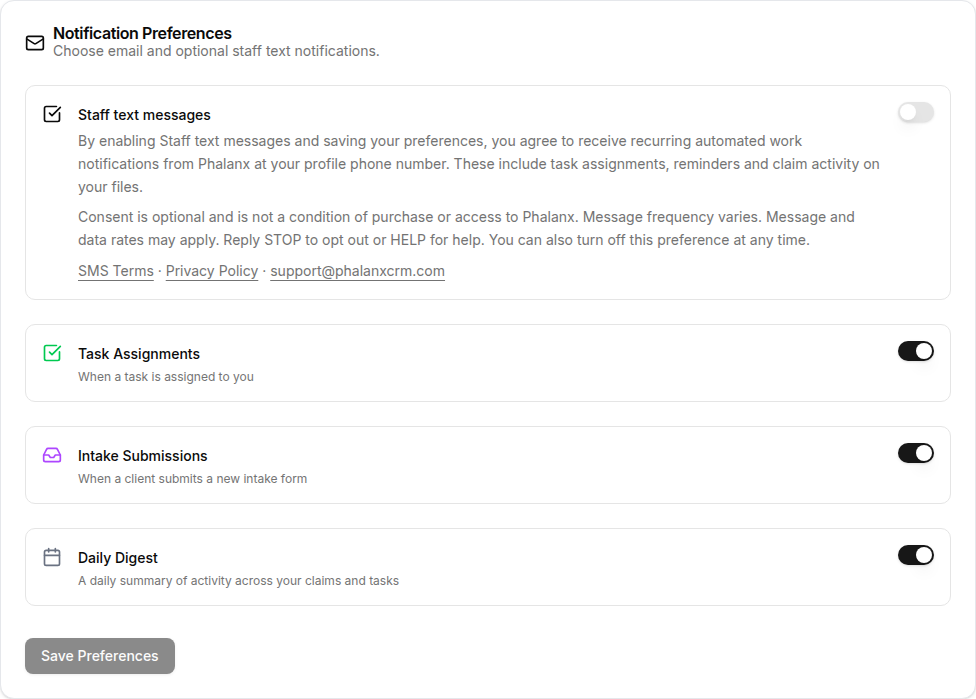
02 / ALWAYS IN CONTROL
Reply STOP to unsubscribe. You can also turn off Staff text messages in Settings and save. Your account stays available.
Reply HELP, email support@phalanxcrm.com.
03 / SMS TERMS
Phalanx is a claims management application operated by Mascolo Solutions LLC. The Phalanx staff messaging program delivers application notifications to staff users who opt in: task assignments, reminders and claim activity. This program is for staff work alerts, not marketing or client messaging.
SMS consent is optional and is not a condition of purchase or application access. Message frequency varies with work activity. Message and data rates may apply. Reply STOP to opt out or HELP for help. You may also disable the saved preference in Settings.
Delivery is subject to carrier availability and is not guaranteed. Your Phalanx account remains the place to check current work. Carriers are not liable for delayed or undelivered messages. Use a mobile number you control; update it if it changes.
Questions about this program: support@phalanxcrm.com. Full terms: phalanxcrm.com/sms-terms.
04 / SMS PRIVACY NOTICE
Your profile phone number and saved SMS preference are used to provide the work notifications you choose. Access is limited to authorized application personnel and service providers needed to operate and deliver this program, including the messaging provider.
Mobile information and SMS opt-in consent are not sold or shared with third parties or affiliates for marketing or promotional purposes. Necessary service providers process this information to deliver the notifications.
This notice describes the staff SMS program. Turning texts off does not delete your application account or work records. For questions about your information or requests concerning it, contact support@phalanxcrm.com. Full policy: phalanxcrm.com/privacy.
HERE TO HELP
Contact Phalanx support for help with your account or text notifications.